Best Ecommerce Platform for SEO in 2026: Shopify vs WooCommerce vs BigCommerce

There’s a question every store owner asks before they build — or before they consider switching. Which platform is actually best for ecommerce SEO?
The honest answer is that no platform hands you rankings. What a platform does is set your technical defaults. It determines whether your canonical tags are clean or messy by default. Whether your URLs are editable or locked. Whether faceted navigation generates thousands of duplicate URLs without you noticing. Whether your site loads fast on mobile before you’ve touched a theme.
Those defaults matter. But they’re not destiny. A well-optimised Shopify store outranks a neglected WooCommerce store every time. Platform choice is one input. It’s not the deciding factor.
Here’s what each platform actually gets right — and wrong — from a pure SEO standpoint.
What Makes an Ecommerce Platform Good or Bad for SEO?
The SEO quality of an ecommerce platform comes down to four technical defaults: URL structure and editability, canonical tag handling on duplicate or filtered pages, schema markup output on product and category pages, and Core Web Vitals baseline before theme or app customisation. Marketing claims about “built-in SEO” are irrelevant. These four factors are what Google actually reads.
Themes, apps, and content come after. If the technical foundation is compromised at the platform level, you’re fixing problems that shouldn’t exist.
Is Shopify Good for SEO?
Shopify is a solid SEO platform by default. It generates XML sitemaps automatically, delivers fast load times via its global CDN, and produces clean HTML output. Its main SEO weakness is structural: product URLs are locked to
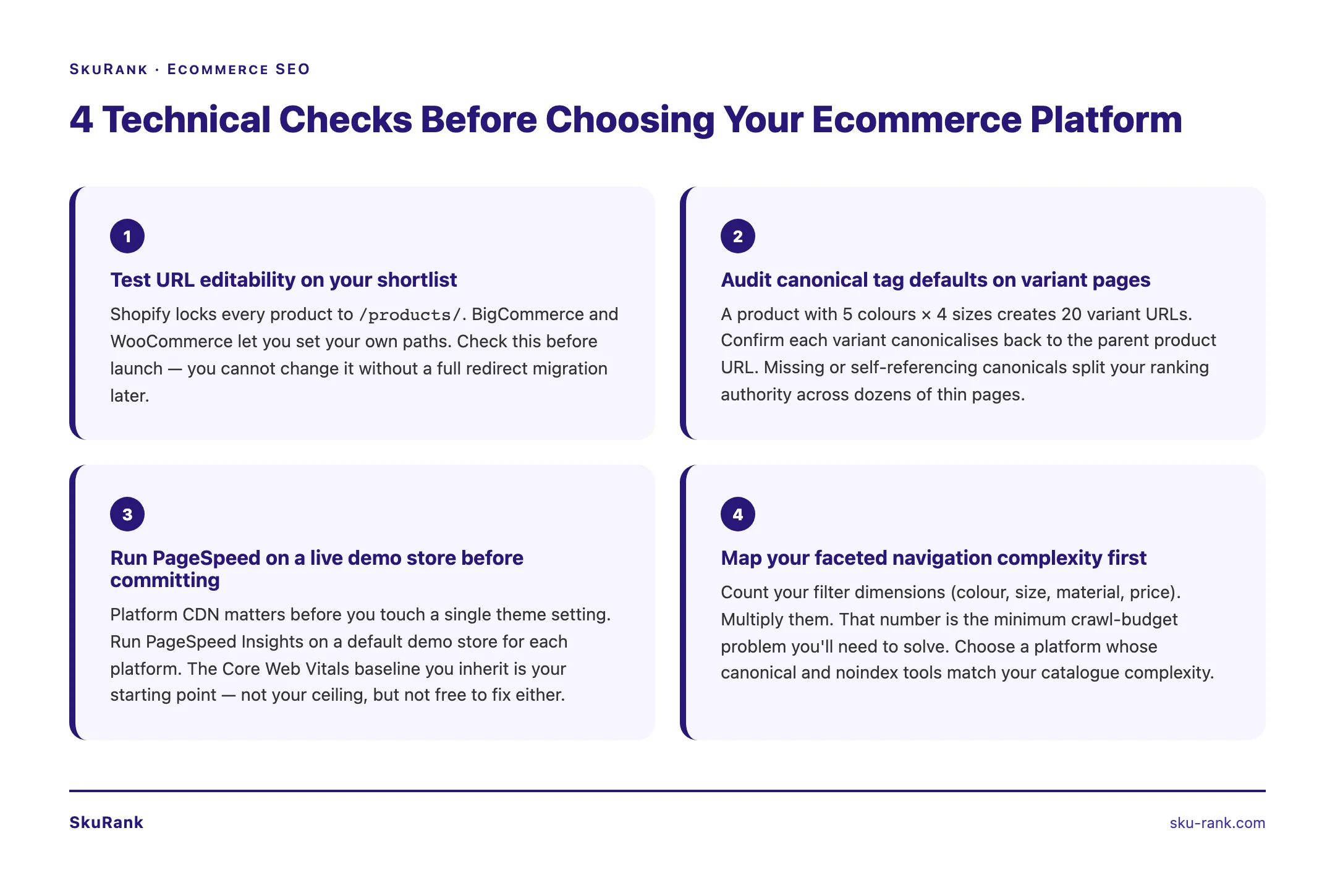
/products/and products attached to multiple collections generate duplicate URLs that Shopify canonicalises automatically — but not always correctly.
What Shopify gets right:
- CDN and Core Web Vitals baseline. Shopify hosts on Fastly’s CDN. Out of the box, most Shopify stores hit reasonable LCP and CLS scores before any performance work. That’s a genuine advantage — especially on mobile.
- Automatic XML sitemap. Shopify generates and updates your sitemap automatically. It includes product pages, collection pages, and blog posts. You don’t configure it.
- Canonical tags on variant pages. When a product has multiple variants (size, colour), each variant gets its own URL. Shopify canonicalises these back to the main product page automatically. Correct behaviour, done without any setup.
- App ecosystem for on-page SEO. Tools like Plug in SEO and SearchPie give you bulk meta title and description editing. Not built-in, but widely available.
Where Shopify creates SEO problems:
- Locked URL structure. Every product URL follows
/products/product-name. You cannot change this. For most stores this is fine. For stores with deep product taxonomies or brand-specific URL strategies, it’s a constraint you live with. - Collection-product URL duplication. Shopify creates two URLs for every product in a collection:
/products/product-nameand/collections/collection-name/products/product-name. Shopify canonicalises the second to the first, but crawl budget is still wasted on the duplicate path — and some third-party apps can interfere with that canonicalisation. - Faceted navigation and filter URLs. If you’re running a large catalogue with filter combinations (colour + size + brand), Shopify generates URL parameters for each combination. Without careful handling, this floods Google’s crawl queue with low-value pages. You need to configure this manually or use an app.
- Blog is an afterthought. Shopify’s blog functionality is basic. If content is a core part of your SEO strategy, you’ll feel the friction.
Is WooCommerce Good for SEO?
WooCommerce is the most flexible ecommerce SEO platform available. You control every URL, every canonical tag, and every schema output. Combined with Rank Math or Yoast, you have full on-page control. The trade-off is that performance depends entirely on your hosting provider, your theme, and your technical maintenance habits — none of which WooCommerce manages for you.
What WooCommerce gets right:
- Full URL control. You set your URL structure.
/shop/category/product-name,/products/product-name, anything. This matters if you’re migrating an existing site or have SEO-specific URL requirements. - Rank Math and Yoast integration. Both plugins are purpose-built for WordPress SEO. Schema markup, canonical management, meta titles at scale, redirect managers, XML sitemap control — it’s all there, and it’s configurable at a level no Shopify app matches.
- Complete canonical flexibility. You decide what canonicalises to what. Faceted navigation, category archives, tag pages, author pages — all controllable. No platform-level decisions made for you.
- Content as a first-class feature. WordPress is a CMS first. If blog content and pillar pages are part of your strategy, WooCommerce gives you the full WordPress content toolkit.
Where WooCommerce creates SEO problems:
- Performance is your problem. WooCommerce does not come with a CDN, performance optimisation, or caching. Your Core Web Vitals depend on your host, your theme, and plugins like WP Rocket or LiteSpeed Cache. A badly configured WooCommerce store on shared hosting can load in 8 seconds. That ranking loss is real.
- Technical debt accumulates fast. Every plugin you install is a potential conflict. Theme updates can break schema output. WordPress core updates can affect plugin behaviour. The flexibility that makes WooCommerce powerful also makes it fragile at scale without active maintenance.
- Hosting costs scale differently. A Shopify store’s performance is relatively predictable as traffic grows. A WooCommerce store on inadequate hosting degrades visibly. You need to plan for managed WordPress hosting — Kinsta, WP Engine, Cloudways — which adds cost.
If you need full technical control and have the capacity to manage a WordPress stack, WooCommerce is the most capable SEO platform available. If you don’t, that flexibility becomes a liability.
Is BigCommerce Good for SEO?
BigCommerce has a clean technical SEO foundation. URL structures are editable, AMP support is built in for product and category pages, and the platform generates proper canonical tags by default. Its practical limitation is ecosystem depth — fewer SEO-specific plugins exist compared to Shopify or WooCommerce, and finding fixes for niche SEO issues requires more research.
What BigCommerce gets right:
- Editable URL structure. Unlike Shopify, BigCommerce lets you customise your URL paths. You’re not locked into
/products/. This is a genuine structural advantage. - Built-in AMP support. BigCommerce includes AMP for product and category pages without additional apps. For mobile-heavy traffic in competitive categories, this has speed implications.
- Clean canonical handling. BigCommerce canonicalises product pages correctly by default, including variant pages. The out-of-the-box behaviour is technically sound.
- No transaction fees. Not an SEO point, but relevant to budget — money saved on platform fees can go toward content or link building.
Where BigCommerce creates SEO problems:
- Smaller plugin ecosystem. Shopify has 8,000+ apps. WooCommerce has 60,000+ plugins. BigCommerce has a fraction of both. If you need a specific SEO fix — hreflang automation, advanced log file analysis integration, bulk schema editing — you may not find a ready-made tool.
- Smaller SEO community. When you hit an edge case SEO issue on Shopify or WooCommerce, there’s a forum thread, a YouTube video, or a developer who’s solved it before. BigCommerce SEO resources are thinner. You’re more likely to need a developer to diagnose and fix problems.
- Complexity for small teams. BigCommerce is built for mid-market and enterprise. Its admin interface and feature set reflect that. For a small store with a lean team, the overhead can slow down execution.
BigCommerce is a competent SEO platform. It’s a better fit for teams that have outgrown Shopify’s constraints but don’t want the WordPress maintenance overhead of WooCommerce.
The Honest Verdict: Which Platform Should You Choose?
No platform is the best ecommerce SEO choice in isolation. Shopify wins on managed performance and speed. WooCommerce wins on full technical control. BigCommerce wins on editable URLs without WordPress overhead. The right choice depends on your headcount, technical capacity, and content strategy.
Platform choice is one variable in a long equation. The stores that rank well in 2026 are not the ones on the “best” platform. They’re the ones that did the SEO work.
That means clean H1s on every product and category page. It means Product schema and BreadcrumbList schema implemented correctly. It means a working internal linking structure from category pages down to products. It means canonical tags that reflect intent, not platform defaults. It means page speed that doesn’t punish mobile users. Check our product page SEO guide to see what this looks like in practice.
Here’s a rough guide:
- Choose Shopify if you want fast setup, predictable performance, and a managed hosting environment. Accept the URL constraints and plan for faceted navigation configuration.
- Choose WooCommerce if you need full technical control, already run WordPress, or have a content-heavy strategy. Invest in managed hosting from day one.
- Choose BigCommerce if you’re mid-market, need editable URLs without the WordPress overhead, and have developer resource available.
There is no wrong answer if you do the work. There’s no right answer if you don’t.
A Warning About Platform Migration for SEO
Switching platforms for SEO reasons almost always causes 2-6 months of ranking volatility. New URL structures require 301 redirects for every page. Canonical tags, schema, and sitemaps all need re-implementation. Only migrate if you have a genuine business reason — not because you heard a different platform is “better for SEO.”
Switching platforms to “improve SEO” is one of the most common and most costly mistakes in ecommerce. A migration from Shopify to WooCommerce — or any direction — involves:
- New URL structures (which require 301 redirects for every page)
- New canonical tag configuration
- Re-implementation of all schema markup
- Re-submission of XML sitemaps
- A period where Google re-crawls and re-evaluates your entire site
Even a technically clean migration causes ranking volatility. Typically 2 to 6 months. Sometimes longer. During that window, organic traffic drops — sometimes significantly. If you’re generating revenue from organic search, that drop has a real cost.
Migrate only if you have a business reason that outweighs the SEO risk. “I heard WooCommerce is better for SEO” is not that reason. If your current platform works, the highest-ROI move is optimising what you have — not rebuilding.
If you’re already considering a migration, make sure you have a full technical SEO for ecommerce plan in place before you touch anything. Redirects, canonicals, schema, and sitemap resubmission need to be mapped before the new site goes live, not after.
The Bottom Line
Shopify, WooCommerce, and BigCommerce are all viable SEO platforms in 2026. None of them rank your store for you. The technical defaults matter — URL structure, canonical handling, Core Web Vitals baseline — but they’re the floor, not the ceiling.
The ceiling is set by the SEO work: product and category page optimisation, schema markup, internal linking, content, and backlinks. That applies equally across all three platforms.
If you want a second opinion on your current platform setup, or you’re unsure whether a technical issue is platform-level or fixable, we’re an ecommerce SEO company that works across all three. No migration pitch. Just honest answers.
For a complete breakdown of what to look for when choosing an agency, read the guide to top ecommerce SEO companies.