Product Page SEO: How to Rank Your Store's Most Important Pages

Most ecommerce SEO advice focuses on category pages — and category pages do matter. But product pages are where the sale actually happens. They’re where a buyer who already knows what they want lands, reads, and converts. Or doesn’t.
The irony is that product pages are both the most commercially important pages in your store and the most SEO-neglected. Category pages get copy. Product pages get whatever the manufacturer sent over.
That neglect has a cost. Google sees hundreds of near-identical pages with duplicate descriptions, missing schema, zero internal links, and URLs that Shopify quietly multiplied across every variant combination. The result: your product pages don’t rank. You pay for ads to send traffic to pages that organic search could be delivering for free.
Here’s how to fix it.
What Is Product Page SEO?
Product page SEO is the process of optimising individual product pages so they rank for specific, buyer-intent search queries. It covers H1 tags, meta titles, unique product descriptions, Product schema markup, canonical URL management, and internal links from category pages. Done well, a single optimised product page can rank for dozens of long-tail queries and drive direct-to-purchase traffic without paid ads.
What 5 Elements Does Every Product Page Need for SEO?
Every product page needs five things to rank: a keyword-matched H1, a unique meta title under 60 characters, Product schema markup with offers and availability, internal links from category pages with descriptive anchor text, and an original product description that no other retailer has published.
Every well-optimised product page needs the same five things. Most stores are missing at least three of them.
1. An H1 that contains your target keyword
Your H1 is the single strongest on-page signal you send to Google. It needs to contain the phrase your buyer is searching — not your internal product code, not the manufacturer’s model name.
If your product is a standing desk and your H1 reads “ErgoFlex Pro 1200-B,” you’re optimising for nobody. The buyer searched “electric standing desk with memory presets.” Your H1 should say something like “Electric Standing Desk with Memory Height Presets.”
In Shopify, the product title becomes the H1. Edit the product title — don’t just change display text in the theme. In WooCommerce, the product name is the H1 by default. Same rule applies.
One product. One H1. One target keyword phrase.
2. A unique meta title
Your meta title is what appears as the clickable blue link in Google results. It’s also a direct ranking signal.
A good meta title for a product page follows this format:
[Keyword-Rich Product Name] | [Brand Name]
Keep it under 60 characters. Include the primary keyword near the start. Don’t duplicate it across multiple products — every page needs a distinct title.
Shopify auto-generates meta titles from product names if you don’t set them manually. Go into each product’s SEO section and write a custom one.
3. Product schema markup
Product schema tells Google what kind of page this is and unlocks rich results — star ratings, price, availability — that appear directly in search results.
Those rich snippets increase click-through rate. More clicks means more traffic from the same ranking position.
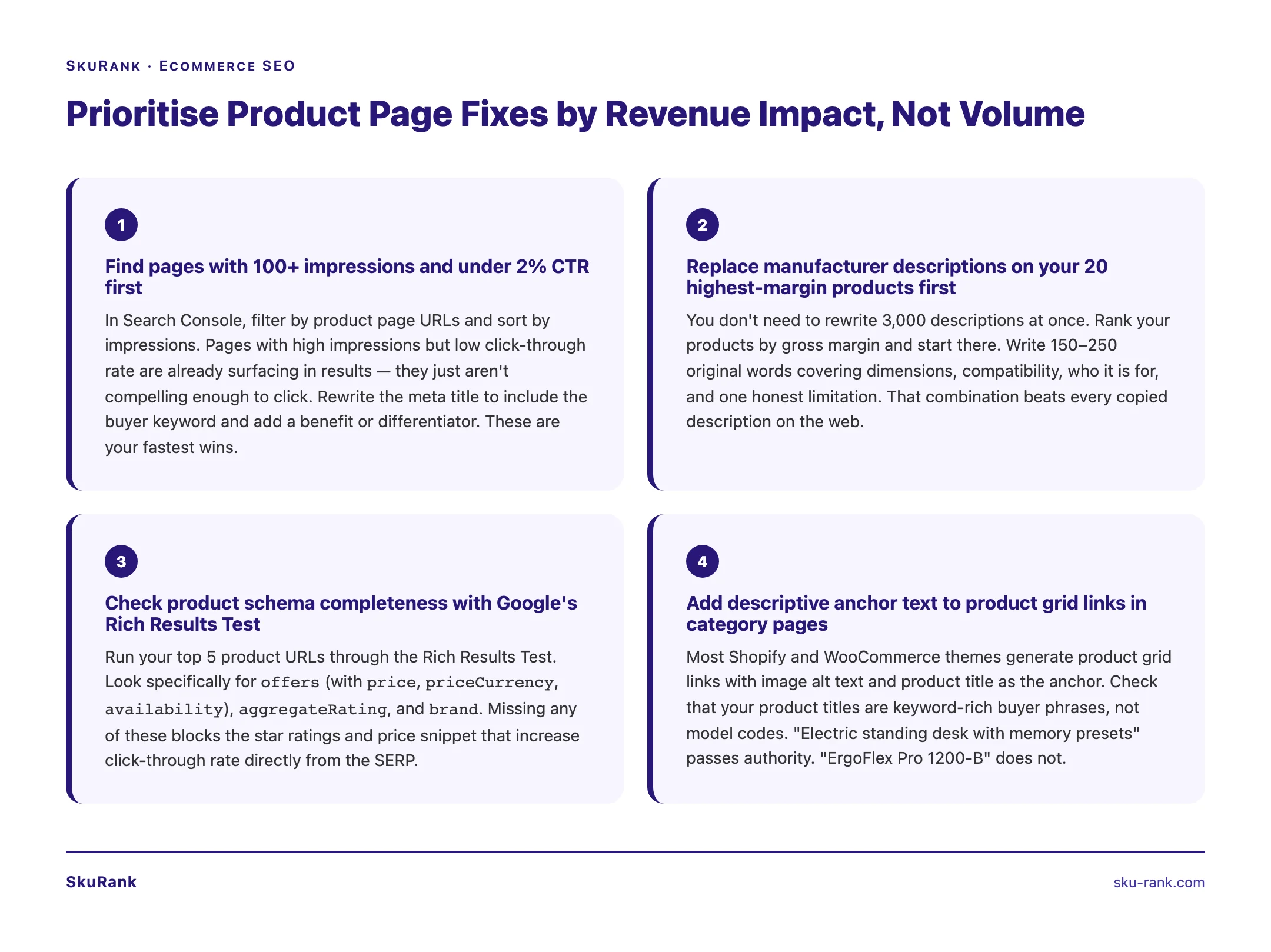
At minimum your Product schema needs: name, description, image, offers (with price, priceCurrency, and availability). Add aggregateRating if you have reviews. Add brand if you have a known brand name.
Most Shopify themes generate basic Product schema automatically, but it’s often incomplete. Check yours with Google’s Rich Results Test.
WooCommerce requires a plugin — Rank Math or Yoast with the WooCommerce add-on both handle this well.
4. Internal links from your category pages
Product pages don’t exist in isolation. Google discovers them through your site’s link architecture.
Your category page for “Electric Standing Desks” should link to each product in that category. That’s standard. But the link anchor text matters. “View product” tells Google nothing. “Electric standing desk with memory presets” tells Google exactly what the page is about.
Most Shopify and WooCommerce themes generate the product grid links automatically with image alt text and product title as anchor. That’s usually fine — but check that your product titles (which become your anchors) are keyword-rich rather than model-code heavy.
Also link from blog posts. If you’ve written “how to set up an ergonomic home office,” link from that post to your standing desk product pages with descriptive anchors. That’s a direct ranking signal.
For a deeper look at the category page side of this, see the category page SEO guide.
5. A unique description — not manufacturer copy
This is the one most stores get wrong. More on it in the next section.
Why Does Copying Manufacturer Descriptions Hurt Your Rankings?
Copying manufacturer descriptions creates duplicate content across the web. Google’s systems identify the original source of that content — typically the manufacturer’s own site or a major retailer who published it first. Every store that copied the same description gets filtered out of results or pushed down in favour of the page Google identified as original.
You are not the first store to sell that product. The manufacturer sent the same 200-word description to every retailer. It’s on Amazon, Walmart, and 40 other Shopify stores. When Google crawls your product page and finds identical text to 50 other URLs, your page offers no unique value. Google has no reason to rank it.
The fix is simple but requires work: write original descriptions.
Not marketing fluff. Not keyword stuffing. Useful, specific, honest copy that answers the questions your buyer has:
- What dimensions is this? (Give exact measurements.)
- What’s it compatible with? (Shopify, WooCommerce, iOS 17+, etc.)
- What material or specification is it? (GSM, wattage, weight, thread count.)
- Who is it for? (Beginners, professionals, people with X problem.)
- What does it not do? (Honest limitations build trust.)
150 to 300 words is enough. The goal is not length — it’s uniqueness and usefulness.
If you have 3,000 product pages, you don’t rewrite all of them at once. Prioritise by traffic potential (see the section on prioritisation below).
How Do Product Variants Create Duplicate URL Problems?
When Shopify or WooCommerce generates separate URLs for product variants — such as different colours or sizes — Google may crawl each variant as a separate page. If those pages share nearly identical content, they compete with each other and dilute your ranking potential. Canonical tags tell Google which URL is the primary version.
This is one of the most common technical SEO problems in ecommerce, and it’s largely invisible to store owners.
Here’s what happens: you have a t-shirt. It comes in 5 colours and 6 sizes. That’s 30 variant combinations.
In Shopify, variant URLs look like:
yourstore.com/products/classic-tee?variant=123456
Shopify handles most of this with canonical tags out of the box — variants typically canonicalise back to the base product URL. But it’s not always clean, especially with older themes or custom code.
In WooCommerce, variable products use a different architecture. Each variation can be accessed as a separate URL depending on how your permalink structure is set up and whether your theme adds query parameters.
What to check:
- Open a product page with variants in your browser. Append
?variant=XXXXXor?attribute_pa_colour=redto the URL. - View page source and search for
<link rel="canonical". - That canonical tag should point to the base product URL — not the variant URL itself.
If variants are self-canonicalising (pointing to themselves), Google sees dozens of near-identical pages and doesn’t know which to rank. Fix it so all variants point canonical to the parent product URL.
This is also a concern with filtered navigation. If a buyer filters your category page to show only “red” products, the filtered URL — yourstore.com/collections/t-shirts?colour=red — can get indexed as a unique page. Category pages face this problem too. At the product level, the variant URL issue is the equivalent.
One product. One canonical URL. All variants pointing back to it.
How Should You Use Internal Links on Product Pages?
Product pages should link up to their parent category page via breadcrumbs, sideways to related products via “you might also like” sections, and back to the homepage for hero products. Anchor text should be descriptive — product names and category phrases, not “related product” or “click here.”
Internal linking on product pages works in both directions — up to category pages, and sideways to related products.
Link up to your category pages.
At the bottom of a product page (or in a breadcrumb trail), link back to the parent category. “See all electric standing desks” with a link to /collections/electric-standing-desks. This reinforces the relationship between the category and the product in Google’s crawl graph.
Breadcrumbs do this automatically if your theme supports them and you’ve enabled BreadcrumbList schema. Check that your breadcrumbs are visible and properly marked up.
Link sideways to related products.
“You might also like” or “frequently bought together” sections provide internal links to other product pages. These are useful for users — and useful for SEO because they distribute authority across your product catalogue.
Keep anchor text descriptive. “Adjustable monitor arm for standing desks” is better than “related product.”
Link back to your homepage from landing areas.
If a product page is a high-priority page — a hero product, your best seller — make sure it’s linked from your homepage or a prominent category page. Authority flows down the link chain. If Google sees your homepage linking to a category page that links to a product page, that product page inherits a meaningful authority signal.
If you want to understand how this connects to the broader strategy, an ecommerce SEO company builds this link architecture deliberately — not just at launch, but as a continuous process.
Which Product Pages Should You Fix First?
Prioritise product pages by impact: first, pages with 100+ impressions but under 2% CTR (quick wins via meta title rewrites); second, pages ranking in positions 5-20 (close to first page); third, pages with zero impressions that should be ranking. Skip low-margin, low-search-volume products entirely.
You probably have more product pages than you can optimise in a week. Here’s a simple prioritisation framework.
Step 1: Find pages that are already getting impressions but not clicks.
Pull your Google Search Console data. Filter by pages. Sort by impressions. Look for product pages with 100+ monthly impressions and a click-through rate below 2%. These pages are surfacing in search results but not compelling enough to click. That usually means your meta title and meta description need work. These are your fastest wins.
Step 2: Find pages ranking in positions 5-20.
Pages in positions 5-20 are close to earning meaningful traffic. A position 15 product page that moves to position 5 might go from 10 monthly clicks to 150. Focus on these pages for deeper optimisation: unique description, schema check, internal link audit.
Step 3: Find pages with zero impressions that should have impressions.
If a product page has no impressions for its target keyword after 3+ months, one of three things is happening:
- The page isn’t indexed (check Coverage in Search Console)
- The keyword is too competitive for the page’s current authority
- The on-page optimisation is so thin that Google doesn’t understand what it’s about
Start with indexation check. Then fix on-page. Then build links.
Step 4: Ignore low-margin, low-volume products for now.
Not every product deserves SEO investment. If a product sells for £12 and has 10 monthly searches, the ROI on optimisation effort is minimal. Prioritise high-margin products and high-search-volume keywords. Run the whole store through this filter before you touch a single description.
The Compound Effect of Getting This Right
Each optimised product page is an asset. It doesn’t expire. It doesn’t cost you per click. If you fix 50 product pages this quarter — unique descriptions, correct H1s, Product schema, clean canonicals — you’ve created 50 pages that can generate organic traffic for years.
The stores that dominate ecommerce SEO aren’t the ones that spend more on ads. They’re the ones that treat their product catalogue as a content asset.
If you want to see exactly where your product pages stand today, take a look at the product page SEO service — we run a full audit before we touch anything.
For a complete overview of how to choose the right agency for this work, read the guide to top ecommerce SEO companies.