Best SEO Tools for Ecommerce: What Actually Helps Shopify and WooCommerce Stores Rank

Most “best SEO tools” roundups are written for content marketers and bloggers. They rank Surfer SEO and Jasper AI highly. They treat keyword research as the main event. They don’t mention faceted navigation, canonical tags, or Core Web Vitals — the things that actually determine whether your product and category pages rank.
This list is different. It’s for Shopify and WooCommerce store owners who need to know which tools are worth paying for, which are worth learning for free, and what each one can — and can’t — actually do.
The short answer: The most important free tool is Google Search Console. For paid, Screaming Frog (£259/year) is essential for technical audits. Ahrefs or Semrush are useful for competitor keyword gaps and rank tracking. On-page tools like Yoast and Rank Math help WooCommerce stores with meta data but won’t fix your underlying technical issues. No tool replaces the work itself — but these are the ones worth your time.
What Should Ecommerce Keyword Research Actually Find?
Ecommerce keyword research isn’t about finding any keyword — it’s about finding buyer-intent terms that match what your product and category pages can realistically rank for. That means commercial intent, low-to-moderate competition, and search volumes that justify a dedicated page.
Google Search Console (free — and the most important tool you have)
Search Console should be the first place you look, and most store owners check it once a month to glance at impressions and ignore the rest.
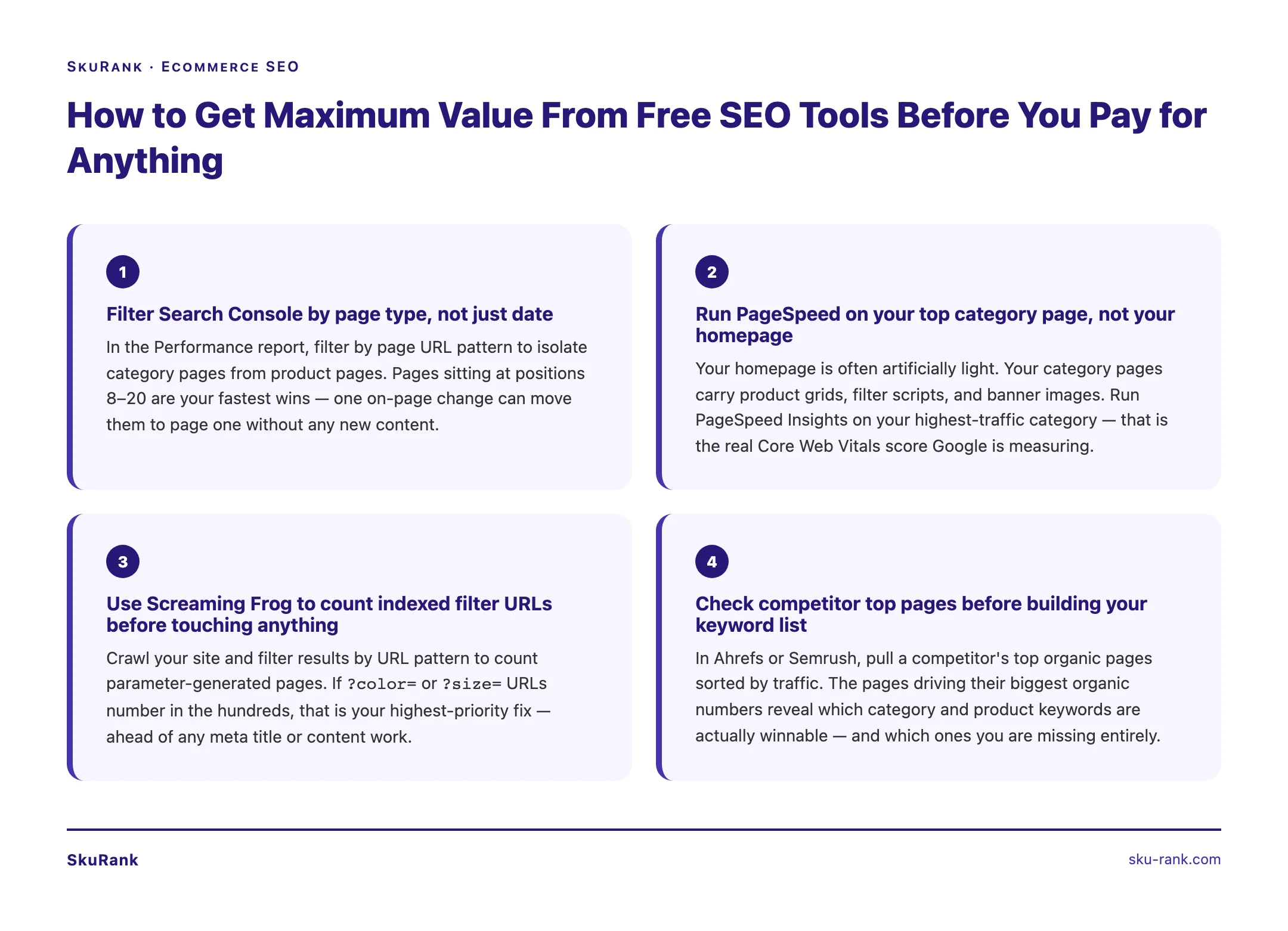
Here’s what it actually tells you. Under the Performance report, filter by page type — look at your category pages specifically. You’ll see which queries they’re already appearing for and, crucially, where you’re ranking at position 8-20. Those are pages one optimisation change away from moving to page one.
You’ll also find queries you’re already ranking for that you didn’t know about. Real buyer language. The exact phrases your customers type before they land on your store. That’s keyword research you can’t buy anywhere.
It’s free. It’s pulling from your actual data. Start here before spending a penny on anything else.
Ahrefs or Semrush (paid — useful for competitor gap analysis)
Both tools do similar things. Ahrefs starts at $129/month. Semrush is comparable. Neither is essential at the start, but both become valuable once you need to understand why a competitor ranks above you for your core product keywords.
The most useful ecommerce workflow in either tool: plug in a competitor’s domain and look at their top pages by organic traffic. You’ll see which of their category pages are pulling the most visitors and which keywords they rank for that you don’t. That’s your gap — and it’s a concrete list of pages to build or optimise.
For keyword research specifically, look for:
- Buyer intent signals — terms like “buy,” “shop,” “best,” “for [use case]” rank above informational terms in conversion value
- Product-adjacent terms — “running shoes for flat feet” converts better than “running shoes” at lower competition
- Category-level volume — 500 monthly searches for a category keyword is worth a dedicated, optimised page
What these tools won’t tell you: whether your Shopify store has canonical issues that are diluting your ranking potential, or whether your Core Web Vitals are bad enough to suppress your rankings algorithmically. That’s a different audit.
Which Tools Actually Find Technical SEO Problems?

Technical SEO problems — duplicate URLs from faceted navigation, slow page load, missing canonical tags, crawl errors — are the most common reason Shopify and WooCommerce stores don’t rank. You need tools that crawl your site the way Google does, not tools that check a checklist.
Screaming Frog (£259/year — the most useful tool for technical audits)
Screaming Frog crawls your site URL by URL and shows you everything: missing title tags, duplicate H1s, pages blocked by robots.txt, redirect chains, canonical tags that point nowhere, and the structure of your internal links.
For ecommerce specifically, it does something no other tool does as well: it shows you the scale of your faceted navigation problem. If you have a clothing store and your filters create URLs like /womens-dresses?color=red&size=12, Screaming Frog will show you how many of those pages exist and whether they have canonical tags pointing back to the canonical category URL.
Without that visibility, you’re guessing. With it, you can see immediately whether your store has 200 pages or 20,000 pages — and Google is trying to crawl all of them.
The free version crawls 500 URLs. Enough to audit a small store. Larger stores need the paid version.
Google PageSpeed Insights and Lighthouse (free — Core Web Vitals)
Core Web Vitals — Largest Contentful Paint (LCP), Cumulative Layout Shift (CLS), and Interaction to Next Paint (INP) — are ranking signals. Google uses them to decide who ranks above who when content quality is otherwise similar.
PageSpeed Insights gives you a real-world score for any URL. Run it on your homepage, your top category page, and your highest-revenue product page. Look at the field data, not just the lab data. The field data is what Google is actually measuring.
Lighthouse runs inside Chrome DevTools. It gives you a more detailed breakdown of what’s slowing your pages down — large uncompressed images, render-blocking JavaScript, third-party scripts (looking at you, Klaviyo pop-up code) that load before your product images.
Both tools are free. Both tell you things that directly affect your rankings. Run them before you spend money on anything else.
Google Search Console (again — for crawl errors)
Search Console’s Coverage report tells you which pages Google has indexed, which it hasn’t, and why. For a Shopify store, common issues include:
- Duplicate pages in the
/collections/and/products/path structure - Pages marked as “Discovered, not indexed” — Google found them but decided not to crawl them yet
- Pages returning soft 404s — the page exists but the product is out of stock
If you have hundreds of “Excluded” pages and you don’t know why, that’s a technical audit conversation. But the tool shows you the problem for free.
How Do You Track Where Your Product and Category Pages Are Ranking?
Rank tracking for ecommerce matters more than for other site types because product and category pages move fast. A competitor adds ten internal links to a category page and jumps from position 11 to position 6 overnight. Without tracking, you won’t know until traffic drops.
Google Search Console (free — baseline tracking)
The Performance report is your free rank tracker. Filter by a specific page — say, your “women’s running shoes” category page — and you’ll see average position over time. It’s not real-time and it doesn’t give you competitor positions, but for a single-store owner watching their own rankings, it’s enough to see trends.
Ahrefs or Semrush (paid — weekly tracking with competitor context)
Both tools let you set up keyword rank tracking and check it weekly. The value over Search Console is:
- You see competitor positions for the same keywords — so you know if your drop is because you fell or because a competitor climbed
- You can track position history over months, not just the rolling 16 months that Search Console provides
- You can segment by device (mobile vs desktop) — important because Google increasingly shows different rankings on mobile
For a Shopify or WooCommerce store tracking 50-100 product and category page keywords, the rank tracking module in either tool is worth the cost if you’re actively doing SEO work and need to know if it’s having an effect.
What Do On-Page Tools Like Yoast and Rank Math Actually Do?
Yoast SEO and Rank Math are WordPress plugins that manage meta titles, meta descriptions, canonical tags, and structured data for WooCommerce. They make it easier to set on-page SEO elements correctly — but they don’t write good copy for you and they can’t fix structural problems.
Yoast SEO and Rank Math (WooCommerce — free tiers available)
Both plugins do the same core jobs:
- Let you set a unique meta title and meta description for every product and category page
- Generate XML sitemaps automatically
- Handle canonical URL settings so duplicate content is attributed to the right URL
- Add basic structured data (Product schema, breadcrumb schema)
Rank Math’s free tier is more generous than Yoast’s. It includes keyword tracking, schema templates, and a few more automation options without paying for premium. For a WooCommerce store starting out, Rank Math free is a reasonable default.
What neither tool does: improve your rankings by itself. Installing Yoast and seeing the green light doesn’t mean your product pages will rank. The green light means your meta title exists and has roughly the right length — not that it contains the keyword your buyers are searching, or that your category page copy is sufficient for Google to understand what the page is about.
Shopify’s native SEO settings
Shopify has built-in SEO fields on every product, collection, and page: editable title tags, meta descriptions, and URL handles. No plugin required.
The limitations are real:
- Shopify appends your store name to every title tag by default — you can edit individual pages but there’s no bulk-edit option in the native dashboard
- Canonical tags are handled automatically, but Shopify’s faceted navigation creates canonical issues that the native settings don’t resolve (you’ll need custom liquid code or a paid app)
- Schema markup is limited to Product schema — no FAQ schema, no breadcrumb schema without a theme-level edit
Apps like SEO Manager or JSON-LD for SEO extend what Shopify can do natively. Both have monthly costs. Whether they’re worth it depends on the scale of your store.
The Honest Take
Tools don’t rank your store. The work does.
A $129/month Ahrefs subscription won’t fix your canonical issues. Screaming Frog won’t write your category page copy. Rank Math’s green lights don’t mean your product pages are competitive. And Search Console won’t tell you what to do with the data — it only shows you what’s there.
The stores that rank are the ones where someone sat down and did the following:
- Ran a proper technical audit and fixed the duplicate URL problems
- Rewrote category page H1s to match actual search queries
- Added copy to category pages (even 100-150 words beats nothing)
- Built internal links from blog content to product and category pages
- Stayed consistent for 90 days
The tools above help you identify what needs doing and measure whether it worked. The doing is still on you — or whoever you hire to do it.
If you want to understand what a proper ecommerce technical SEO audit looks at under the hood, our ecommerce technical SEO service covers the full scope: crawl analysis, faceted navigation fixes, Core Web Vitals improvements, and on-page optimisation for product and category pages.
You can also see how SkuRank compares to other ecommerce SEO companies if you’re evaluating agencies. For a broader comparison of what’s available in the market, this guide to top ecommerce SEO companies covers what to look for before signing anything.